Tia News
Can screen-based tutoring meet students where they feel comfortable?
Screen based tutoring for students works when comfort supports real learning. Compare lesson formats, check curriculum fit, and assess independent understanding.
By Tia Education Team · Published

Yes, screen-based tutoring can meet students where they feel comfortable when the teaching adapts to their pace, interests, and curriculum. If your student opens a lesson more willingly on a screen than on paper, you can use that preference without making the screen the goal. The test is what your student can explain and do independently, not how long the device stays open.
- Screen based tutoring for students is a useful fit when familiar technology supports active learning, not passive watching.
- Tia personal tutoring adapts Math, English, and Science teaching to students’ pace, level, interests, and curriculum.
- Choose a lesson format by the student’s needs, then check understanding away from the explanation.
- Use engaged-time records alongside student work, not as proof of mastery.
Why this matters
You might recognize the moment: your student resists another worksheet but is ready to try the same subject on a screen. You do not need to dismiss that preference. You need to find out whether the lesson turns willingness into learning.
When choosing tutoring in 2026, separate the delivery format from the teaching method. A screen is where the lesson happens; adaptation is how the teaching responds. The guide to how adaptive tutoring changes a lesson explains that distinction.
Your role is not to supervise every answer. It is to choose a suitable resource, protect time for learning, and notice when the approach needs adjusting.
Can screen-based tutoring meet students where they feel comfortable?
Yes, when the screen gives your student a comfortable place to attempt challenging work and the tutoring responds to that work. Comfort is a starting condition, not the learning outcome. A student still needs to think, make attempts, receive explanations, and practice without simply copying an answer.
Compare formats by what happens after your student gets stuck. Does the lesson continue unchanged? Does the student receive a different explanation? Is there an opportunity to attempt the problem again?
| Lesson format | Best for | Useful feature | Limitation to check |
|---|---|---|---|
| Recorded screen lesson | Reviewing a particular explanation | You can pause and revisit the material | The recording itself does not respond to a student’s mistake |
| Adaptive screen tutoring | Students who need teaching adjusted to their pace and level | Teaching changes in response to the student | Adaptation still needs to match the right curriculum and learning goal |
| Live tutoring | Students who want a real-time conversation with a person | You can discuss difficulties directly | Check whether the tutor changes the explanation rather than repeating it |
| Paper or hands-on practice | Showing thinking away from the screen | Written steps or physical models make the attempt visible | The material alone does not explain an error |
These formats are not mutually exclusive. You can use a screen lesson for explanation and paper for an independent attempt. Choose the combination that serves the task rather than requiring every subject to look the same.
For a 2026 tutoring decision, ask for evidence of teaching, not just an attractive lesson library. A large collection of content does not tell you whether a particular explanation fits your student.
What should personalized screen tutoring actually change?
Personalized teaching should respond to the learner while keeping the curriculum goal clear. An interest-based example is useful only if it helps your student work on the intended concept. Enjoying the example is not enough.
Look for these changes during a lesson:
- Pace: Your student has room to work through a difficult step rather than follow a fixed speed.
- Starting level: The explanation begins with knowledge your student can use.
- Examples: A familiar interest provides context for an unfamiliar concept.
- Explanation: When the first approach does not make sense, the teaching changes.
- Curriculum focus: The lesson addresses the material your student actually needs to learn.
For example, you might connect ratios to a recipe your student knows. The learning goal remains comparing quantities. After the familiar example, ask your student to apply the same idea in a different setting.
That final move matters. A student who understands only the recipe example still needs help recognizing the mathematical relationship elsewhere.
Where Tia fits
Tia is best for students in Grades 5 to 12 who need adaptive personal tutoring in Math, English, or Science. It adjusts teaching to the student’s pace, level, and interests while aligning with the relevant curriculum. Parents get a live dashboard, engaged-time measurement, and self-writing records.
The benefit is responsive teaching with visibility for the parent. The boundary is equally clear: Tia’s stated subjects are Math, English, and Science, and its stated range is Grades 5 to 12. Dashboard activity should accompany examples of student understanding, not replace them.
You stay responsible for choosing the learning goals and checking your family’s reporting requirements. Your student stays responsible for doing the thinking.
Why the fit of screen-based tutoring varies
The same format does not suit every student or every task. Choose screen based tutoring for students by the work it helps them do, rather than by whether they generally enjoy devices.
- Comfort with the format: Ask whether your student feels ready to attempt the lesson on screen.
- Current understanding: A familiar device does not remove gaps in the subject.
- Pace and stamina: Adjust the amount of work to what your student can engage with that day.
- Interest in the example: Use an interest that makes the concept familiar, then return to the curriculum goal.
- Subject task: Reading, explaining a science idea, and solving an equation require different kinds of practice.
- Parent visibility: Check whether records help you distinguish engaged learning from elapsed time.
Listen to your student’s description of the difficulty. If the explanation is confusing, a longer session does not address that problem. If the lesson is understandable but the student needs a break, repeating the explanation does not address that problem either.
In 2026, make the decision about the actual lesson. A general preference for screens is a reason to try the format, not a guarantee that every screen resource fits.
How can you try screen tutoring without rebuilding your routine?
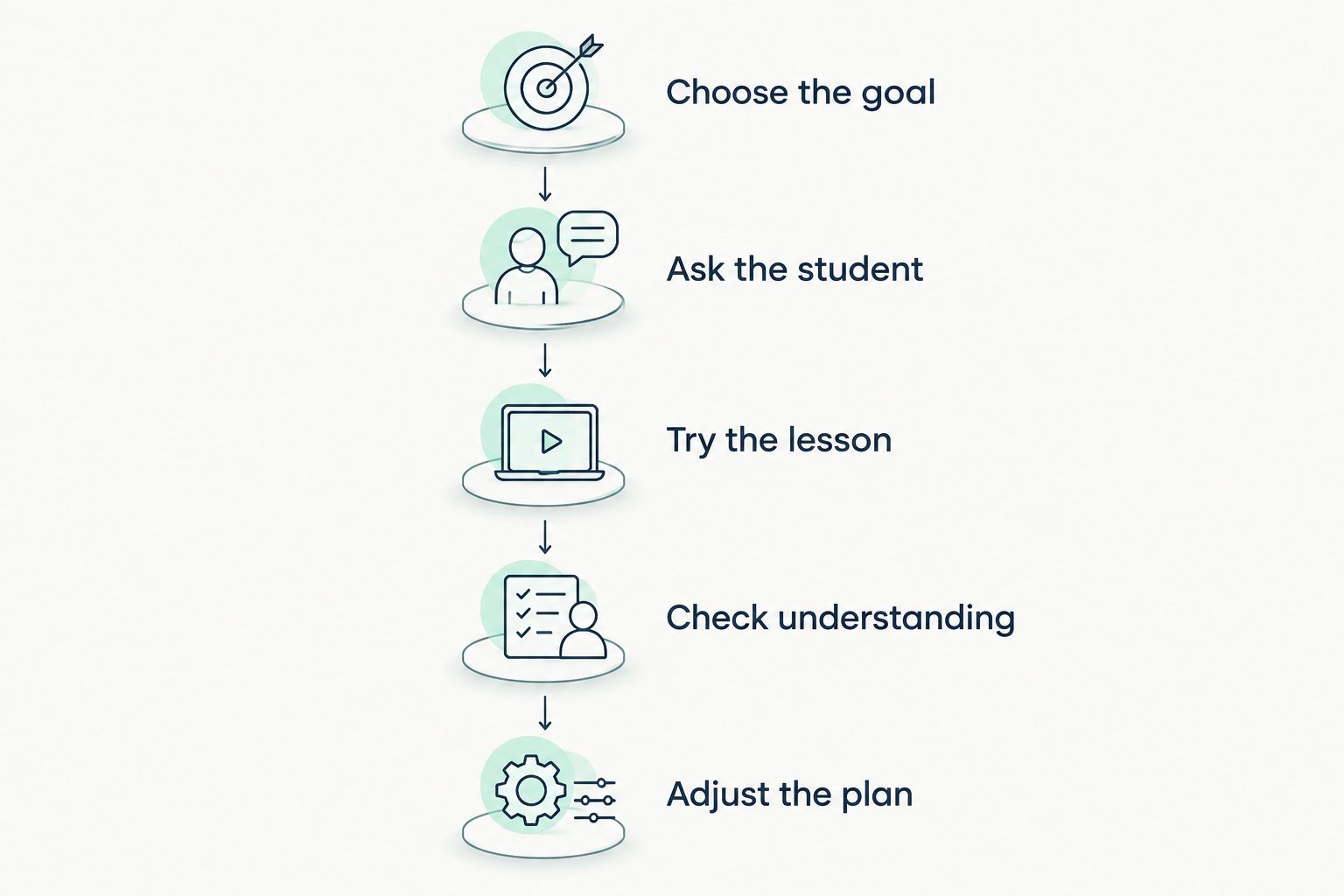
Start with a subject task your student already needs to complete. Keep the rest of the routine familiar. This gives you a clearer way to judge the tutoring itself.
Choose the goal
Name a specific learning goal before opening the lesson. Understanding equivalent fractions is clearer than working on math. Explaining a paragraph’s main idea is clearer than doing English.
Write the goal in plain language your student understands. You are choosing the destination, not prescribing every step the tutor must take.
Ask the student
Ask what makes the subject difficult and what kind of explanation they want to try. Leave room for an honest answer. Your student does not have to defend a preference for learning on screen.
An interest can suggest a useful example. It does not need to become the theme of every lesson.
Try the lesson
Use a manageable session rather than setting a long duration as the first test. As little as 10 minutes can be a starting point when that fits your student. That duration is an option, not a promise of a particular result.
Notice whether your student attempts the work and responds to the explanation. You do not need to hover over every step.
Check understanding
After the explanation, ask your student to attempt a related task without copying. Depending on the subject, they can write a solution, explain a concept aloud, or support an interpretation with evidence from a passage.
Keep the check connected to the original goal. Do not turn it into an unexpected test of unrelated material.
Adjust the plan
Use what happened to choose the next move. Continue if the lesson fits; change the pace, example, or resource if it does not.
Changing the method is not abandoning the goal. You can keep the curriculum target and choose a different route toward it.
What should you track besides time on screen?
Track the learning task, the student’s attempt, and the next step. Time helps describe the session. It does not, by itself, describe understanding.
For your 2026 learning records, keep the notes useful rather than elaborate. Record the topic and save a relevant piece of work. Add a brief note about what your student completed independently and where support was still needed.
Separate these questions:
- Was your student engaged with the lesson?
- What did your student understand during the explanation?
- What did your student complete without that explanation?
- What needs another attempt?
Tia’s parent dashboard and engaged-time measurement provide visibility into tutoring activity. Its self-writing records also support homeschool reporting. Use those records alongside student work, and check local requirements rather than assuming any tutoring record guarantees compliance.
A calm review is more useful than constant observation. You can ask your student to show a piece of work and explain a choice. That keeps the conversation about learning instead of monitoring.
Does screen tutoring mean all practice should happen on a device?
No, screen tutoring does not require all practice to happen on a device. Choose the medium that makes the task clear. A screen explanation can sit alongside a notebook, a book, a physical model, or an oral discussion.
For fractions, you might use a chocolate bar divided into eighths, then connect the pieces to a drawing and mathematical symbols. This is a practical way to represent the idea, not a claim that physical objects produce a fixed improvement.
For English, your student can read a passage away from the screen and return to discuss the evidence. For Science, ask for a written explanation or labeled sketch of the concept being studied.
The boundary is the learning goal. You are not trying to maximize screen use or eliminate it. You are choosing where each part of the work makes sense.
How do you know when the screen format is not helping?
The format needs another look when your student cannot engage with the task or cannot explain what they have practiced. Start by identifying the obstacle. Do not assume the device is the cause of every difficult session.
Check whether the starting level is appropriate and whether the explanation addresses the actual confusion. Ask whether a movement break, shorter lesson, paper attempt, or conversation would help your student continue.
If the same difficulty persists, change the approach. A comfortable format is useful, but it should not become a reason to keep a lesson that does not fit.
FAQ
Is screen based tutoring for students a good choice in 2026?
Screen based tutoring for students is a good choice in 2026 when the format feels comfortable and the teaching matches the student’s pace, level, and curriculum. Check whether the student can explain or complete related work independently.
Is watching an educational video the same as tutoring?
Watching an educational video is not the same as responsive tutoring. A recording presents an explanation, while responsive tutoring changes the teaching when the student needs a different approach.
Can a short screen tutoring session be useful?
A session of 10 minutes is a possible starting point when it fits the student and the task. Choose a clear goal and check understanding rather than expecting a fixed result from the duration.
What grades and subjects does Tia cover?
Tia provides personal tutoring for students in Grades 5 to 12 in Math, English, and Science. Teaching adapts to the student’s pace, level, and interests and aligns with the relevant curriculum.
Should I sit beside my student throughout an online lesson?
You do not need to make constant supervision the goal. Agree on the learning task, provide the support your student needs, and review a piece of work afterward.
Does engaged time prove that my student understands the topic?
Engaged time does not prove understanding by itself. Pair activity records with a student explanation or an independent attempt at related work.
One last thing
Ask your student to show you where an explanation stopped making sense. That is more specific than asking whether the lesson was good or bad. It gives you a place to adjust without judging the whole session.
Keep that question in your 2026 learning routine. A screen can be a comfortable place to begin, while your student’s work tells you what to do next.