Tia News
What Parents Should See in a Tutoring Dashboard
See what a tutoring parent dashboard should show: curriculum-mapped mastery, engaged time and clear next steps. Tia connects teaching with parent records.
By Tia Education Team · Published · Last updated
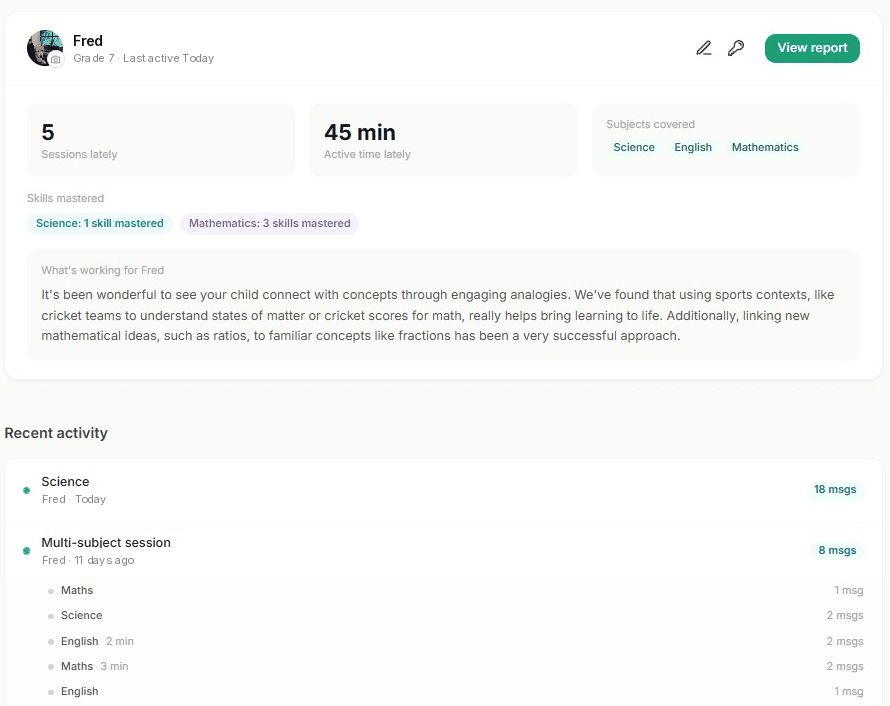
A tutoring parent dashboard should show five things clearly: what the student worked on, how long they were actively engaged, which skills they mastered, what needs attention next, and whether usable progress records are being created. In 2026, a login count or one overall score is not enough because neither tells you what happened during tutoring.
- A tutoring parent dashboard should show engaged time, sessions, skills, next steps and usable progress records.
- Tia combines curriculum-mapped mastery, engaged time, weekly summaries and self-writing records in its parent view.
- Separate parent and student logins keep oversight clear without putting parents inside the learning session.
- Compare what a dashboard measures, how often it updates and whether the records can be used outside the platform.
- A score shows the result; session detail explains what produced it.
Why this matters
Parents often buy tutoring because they can see a problem but cannot see what is causing it. A low math grade might reflect one missed concept, weak confidence, rushed work or a student who is logged in but not actually engaged. The dashboard should help separate those causes.
That visibility matters more as subject material gets harder. A Washington Post finding reported that 51% of parents doubt their ability to teach upper-grade material. The Education Endowment Foundation reports that one-to-one tuition adds roughly five months of progress, while Bloom's two-sigma finding placed the average tutored student at the 98th percentile. Those findings support tutoring, but parents still need a practical way to see whether it is working for their own student.
Tia's parent dashboard connects learning activity with skill-level understanding. Tia measures mastery per question, maps it to the curriculum and includes it in the report, so you can see more than how long a session lasted.
What should a tutoring parent dashboard show?
A useful tutoring parent dashboard should connect activity to learning. It should let you move from a simple question, such as "Did my student work this week?", to a useful answer, such as "They completed three science sessions, stayed actively engaged, mastered one skill and still need support with another."
| Dashboard signal | What it should answer | Red flag |
|---|---|---|
| Session history | What did the student work on? | Only a total login count |
| Engaged time | How long were they actively learning? | Time logged in with no activity distinction |
| Skills mastered | What can they now do independently? | One overall percentage with no topic detail |
| Next steps | What should happen in the next session? | No indication of remaining gaps |
| Weekly summary | Can a parent stay informed without checking daily? | Updates only when the parent remembers to log in |
| Progress records | Can the work support homeschool reporting? | No dates, attendance or curriculum coverage |
Show session history in plain language
The session list should name the subject and topic, show when the work happened, and make recent activity easy to scan. Parents should not need to decode internal course codes or open every answer to understand the week.
A useful session record includes:
- Date and subject
- Topic or curriculum area
- Active session duration
- Skills practiced or mastered
- A short explanation of what went well
- A clear indication of what comes next
The point is not surveillance. It is context. When a student says a chemistry session was difficult, the parent should be able to see whether the difficulty came from equations, unit conversions or an earlier concept that needs review.
Measure engaged time, not an open browser tab
Logged-in time and engaged time are different. A student can leave a page open while eating lunch, answering a message or walking away from the device. A tutoring parent dashboard should separate time spent actively working from time the account was merely open.
In 2026, ask every provider one direct question: What activity counts toward the time shown in the parent dashboard? A clear answer should describe active learning behavior. A vague answer that relies on login duration gives you a number, but not proof of work.
Engaged time becomes more useful when it appears beside the session topic. Forty active minutes on algebra says something different from forty minutes spread across several short activities. The dashboard should preserve that difference.
Track understanding as answers accumulate
Tia is built on adaptive mastery tracking using Bayesian Knowledge Tracing. This established method updates an estimate of skill mastery from student answers over time. A learning record can follow developing understanding rather than equating one correct answer or a completed lesson with mastery.
Tia maps that question-level evidence to the curriculum and includes it in parent reports. Engaged time answers how actively the student worked; mastery tracking answers a separate question about their understanding. Together, they give you a more useful basis for the next conversation.
Break progress down by skill and subject
One overall score is easy to read and hard to act on. A student can look fine across a whole subject while remaining stuck on one skill that affects every later lesson.
A strong dashboard should show progress at three levels:
- Subject: Math, English or Science.
- Topic: The curriculum area covered during the session.
- Skill: The specific ability the student practiced or mastered.
This structure lets parents ask better questions. Instead of "Why is math still hard?", the conversation becomes "Fractions are improving, but converting them to decimals still needs work." That is a smaller and more solvable problem.
Explain what is working
Numbers alone can make a dashboard feel like a report card. A short narrative adds the context parents need: which explanation helped, where confidence improved, and what type of example kept the student engaged.
For a personalized tutor, this matters because the teaching method should adapt. If sports examples helped a student understand ratios, or visual explanations improved a science concept, the parent should be able to see that pattern. The summary should be specific enough to guide the next session, not generic praise that could apply to anyone.
Send a weekly summary without replacing the live view
A weekly email summary is useful because most parents will not open a dashboard every day. It should summarize recent sessions, engaged time, skills mastered and any area that needs attention.
The email should support the dashboard, not replace it. A parent who wants detail should be able to move from the summary to the underlying session record. In 2026, the best setup is a live source of truth plus a short weekly reminder.
Create progress records as the student works
Homeschool families often need more than a progress chart. They may need dated records of attendance, time spent and curriculum covered. Requirements vary by state, so families should check their own reporting rules, but the administrative need is consistent: records are easier to use when they build automatically during normal tutoring.
A self-writing progress report should include:
- Student and reporting period
- Subjects covered
- Session dates and attendance
- Engaged time by subject
- Skills or curriculum areas covered
- A format that can be saved or exported
This is different from a promotional progress badge. It is a practical record that a parent can keep with the rest of the student's documentation. The distinction is especially important for first-year homeschoolers who are still building a reporting routine.
Keep parent and student access separate
A parent should not need to use the student's account to check progress. Separate access keeps the learning space focused while giving the parent a clear overview.
Separate logins also reduce confusion about who completed an action. The student account is for learning. The parent account is for oversight, records and decisions. In 2026, that separation should be a basic buying requirement, not an optional extra.
How do you compare tutoring dashboards before signing up?
Ask providers to show what the parent sees, not just describe it. Screenshots, a guided walkthrough or a trial account reveal more than a feature list.
Use this seven-point check:
- Does the dashboard update after each session?
- Does it distinguish engaged time from login time?
- Can you see progress by subject, topic and skill?
- Does it explain what worked and what needs attention?
- Is there a weekly summary for parents?
- Can homeschool records be saved or exported?
- Does the parent have a separate login?
Then test the answers against a real session. If the provider says it tracks mastery, check whether the dashboard names the mastered skill. If it claims to track time, check whether idle time is excluded. If it offers reports, inspect whether those reports include dates and curriculum coverage.
What a tutoring parent dashboard cannot prove
A dashboard is evidence, not the whole learning relationship. It can show activity, progression and records. It cannot tell you everything about motivation, frustration or whether a student needs a scheduled person present for accountability.
That limitation matters when choosing between flexible tutoring and fixed appointments. Some students work well at their own pace. Others need a set time and a person waiting for them. The honest choice is the one that fits the student's behavior, not the dashboard with the largest number of charts.
The dashboard also should not turn every session into a performance review. Parents need enough information to support the student without taking over the session. The strongest systems summarize the evidence and leave the parent in charge of how to respond.
Where Tia fits
Tia is best for parents who want a tutoring parent dashboard that shows active learning without requiring them to supervise every session. It covers Math, English and Science for Grades 5 to 12 and adapts teaching to each student's pace, level and interests.
Tia gives parents a separate login. The live dashboard shows recent sessions, engaged time, subjects covered, skills mastered and a plain-language explanation of what is working. A weekly email summary keeps parents informed when they do not open the dashboard, and self-writing reports capture time, attendance and curriculum coverage for homeschool records.
Tia combines student-shaped teaching with curriculum-mapped mastery and self-writing records. You can stay informed without delivering every explanation or rebuilding the learning history afterward. It remains a personal tutoring service, not a booked appointment with a human instructor.
FAQ
What should a tutoring parent dashboard show in 2026?
A tutoring parent dashboard should show session history, engaged time, skills mastered, next steps, weekly summaries and usable progress records. It should explain what happened during learning, not just display a login count or overall score.
What is the difference between engaged time and logged-in time?
Engaged time counts active learning, while logged-in time can include periods when a browser tab is open but the student is inactive. Parents should ask each provider exactly what activity qualifies for the time shown.
How often should a tutoring dashboard update?
A useful dashboard should update after each completed session. A weekly email can summarize progress, but it should link back to the detailed live record rather than replace it.
Can a tutoring dashboard help with homeschool records?
Yes, when it records dates, attendance, engaged time and curriculum coverage in a form that can be saved or exported. Homeschool requirements vary by state, so parents should confirm what their own records must include.
Should parents and students have separate tutoring logins?
Yes, separate logins keep the student's learning space distinct from the parent's oversight and reporting view. The parent should not need to enter the student account to see progress.
Is Tia a good tutoring service for parents who want progress tracking?
Tia combines adaptive teaching with question-level mastery mapped to the curriculum, engaged time and self-writing reports. Its Bayesian Knowledge Tracing updates mastery estimates from answers over time for Math, English and Science students in Grades 5 to 12.
Does a parent dashboard replace talking with a student?
No, a dashboard provides evidence and context, but it does not replace a conversation about confidence, frustration or motivation. Use the data to ask a specific question rather than treating the dashboard as a scorecard.
How do I test a tutoring dashboard before choosing a service?
Use a trial or walkthrough and check one real session against the provider's claims. Confirm that the dashboard names the topic, separates engaged time, shows skill progress and creates a parent-readable summary.
One last thing
Read participation and understanding together. Engaged time shows active work; curriculum-mapped mastery shows the developing understanding recorded from answers. Neither a login total nor a row of badges gives you that complete picture. In 2026, ask to see both before choosing tutoring.
If you want to see whether Tia's approach fits your student, start at Tia. 14-day free trial, no card needed.