Tia News
Engaged time to homeschool compliance report: complete 2026 workflow
Build a homeschool compliance report from engaged time, work samples, and parent notes. Follow a clear workflow while checking your state's reporting rules.
By Tia Education Team · Published

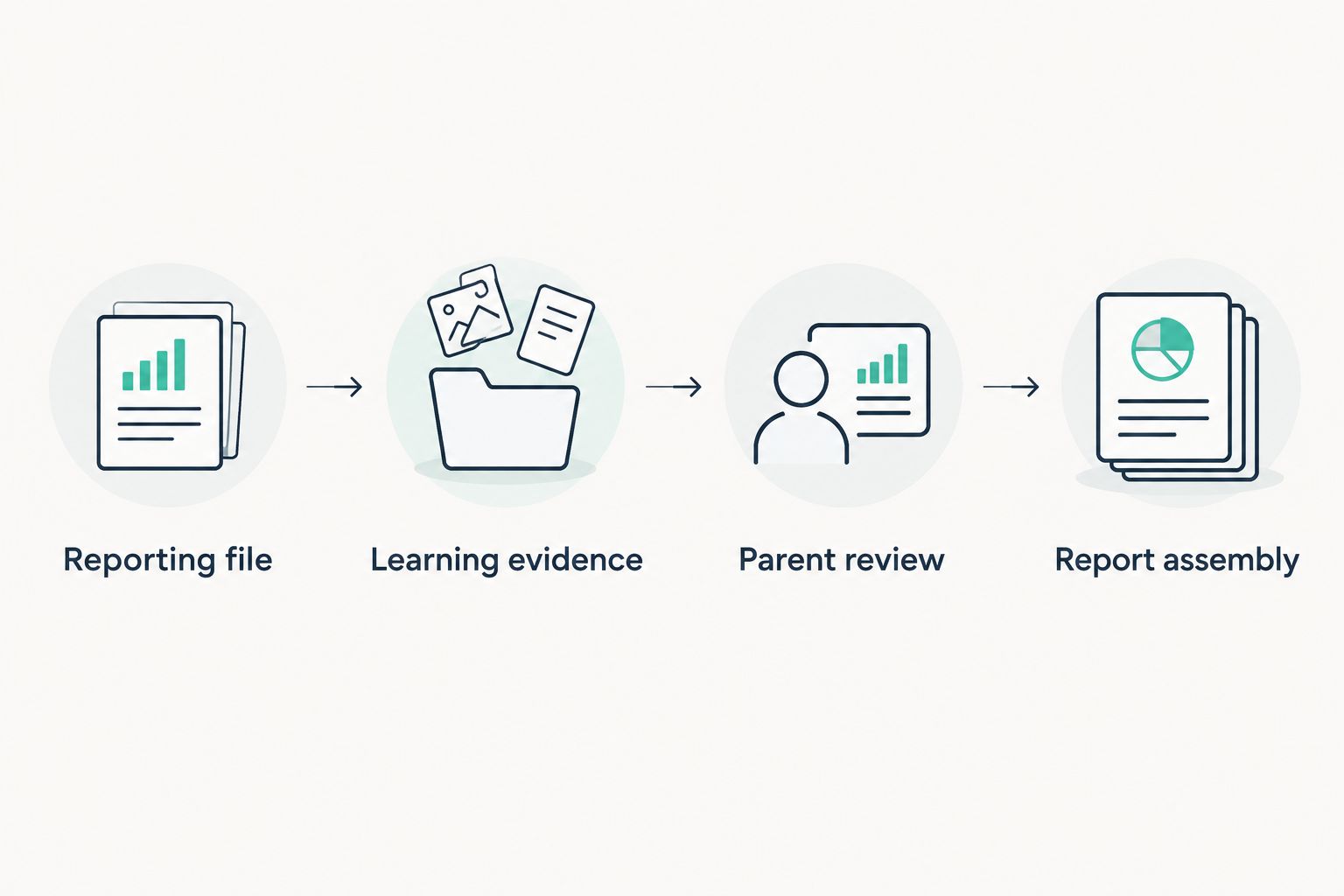
Instead of rebuilding your student’s learning history at reporting time, use engaged-time records, work samples, and a regular parent review to assemble your homeschool compliance report. This 2026 workflow turns those pieces into an organized record, while keeping you responsible for checking your state’s requirements.
- Tia fits homeschool parents seeking personalized tutoring with engaged-time records, a parent dashboard, and self-writing records.
- Build your homeschool compliance report around current state requirements, not tutoring minutes alone.
- Keep engaged time, attendance, learning evidence, and parent observations distinct in your homeschool records.
- Review records regularly and assemble only the information your reporting route requires.
Why this matters
You remember the afternoon your student finally understood fractions. Finding the date, the work, and the explanation months later is another task entirely. A repeatable recordkeeping routine preserves that learning without asking you to reconstruct every lesson.
Tia provides personalized tutoring in Math, English, and Science, with a live parent dashboard, engaged-time measurement, and self-writing homeschool records. Tia is best for homeschool parents who want a personal tutor alongside ongoing learning records. Those records support your reporting process; they do not establish legal compliance by themselves.
A homeschool compliance report is a record assembled to meet the requirements of your applicable homeschool route. It is not a single nationwide form. Start with the current requirements that apply to your family, then organize your evidence around them.
Record what happened before deciding what it proves. Time spent learning, a completed assignment, and demonstrated understanding tell different parts of the story.
Before you start
- Access and materials: Have access to your parent dashboard and learning records, your student’s offline work, and a parent-controlled document or spreadsheet. Keep a separate file for each student.
- Reporting requirements: Locate the current official guidance for your state and homeschool route. Confirm the reporting period, required information, recipient, deadline, and retention instructions before building your 2026 report.
- The gotcha: Engaged tutoring time is not automatically attendance, credit, or mastery. Do not convert a dashboard total into a legal reporting category without checking what that category requires.
You do not need a complicated document to begin. You need a reliable place to keep source records and a clear distinction between facts, observations, and requirements. If your family reports through a school or another supervising arrangement, use its instructions alongside the applicable official guidance.
Set up your reporting file
The first configuration unit is your own reporting document, not a tutoring setting. The labels below are suggested document headings, not claims about dashboard buttons or export features.
- Define the scope. Write the student’s name, the reporting period, and the homeschool route at the top. Use exact start and end dates rather than a loose description such as “fall.”
- Record the requirements. Create a heading called Requirements. Note each required item, where the instruction comes from, and when you checked it. Separate items you must submit from records you must retain.
- Create the evidence sections. Add Attendance, Learning records, Work samples, and Parent observations as working headings. Remove or adapt sections when your requirements call for a different structure.
- Choose a filing convention. Include the student, subject, and date in filenames. A pattern such as
2026-student-math-date-topicmakes the purpose visible without opening every file. - Assign a review rhythm. Start with 1 review per week as an organizational choice, not a legal requirement. Put that review on your calendar and adjust it if your records need more frequent attention.
Expected result: You have a parent-controlled file with a defined period and a checklist tied to the instructions that apply to your family. Nothing in the file is labeled “compliant” solely because a tutor generated it.
Keep your source records separate
Preserve original learning records separately from your edited report. Summaries are useful for reading, but original records let you check an entry later. Store corrections alongside the source rather than quietly changing what the original record said.
Use a separate working copy for the report. That keeps a formatting change, shortened explanation, or corrected subject heading from overwriting the evidence behind it.
Collect the learning evidence
The second configuration unit connects tutoring records with the rest of your student’s learning. Tia’s personalized tutoring records describe tutoring activity, not every activity in your homeschool. Reading together, practical science, written assignments, and other instruction need their own records when relevant.
- Identify the activity. For each entry, record the date, subject, and topic using information you can verify. Keep subject names consistent across your file.
- Preserve the time label. Record engaged time as engaged time. Do not relabel it as elapsed session time, attendance, or instructional hours simply to fit a column.
- Connect the evidence. Associate the entry with a work sample or an accurate parent note when one exists. Start with 1 work sample per subject as a manageable filing habit, not a claim that this meets any state requirement.
- Add offline learning. Record relevant work completed away from the tutor. Identify its source so you can distinguish parent-recorded activities from tutoring records.
- Separate observation from inference. Write what your student did. If you observed independent work, say so; if you did not, leave independence unclaimed.
Expected result: Each learning entry identifies its source and connects activity with evidence where available. Your report does not imply that time alone demonstrates understanding.
Use a simple evidence table
These are record types, not competing products. Each has a different purpose and a limitation.
| Record type | Best for | Strength | Limitation |
|---|---|---|---|
| Engaged-time record | Documenting recorded tutoring engagement | Preserves a specific activity measure | Does not establish mastery or total homeschool attendance |
| Work sample | Showing what the student produced | Makes the learning visible | Needs context about the task and help provided |
| Parent observation | Recording explanations and offline learning | Captures evidence outside tutoring | Depends on accurate, timely notes |
| Attendance record | Documenting attendance under applicable rules | Keeps attendance separate from subject progress | Must follow the definition that applies to your homeschool route |
Use these records together rather than asking one record to do every job. A science write-up shows the work. A parent note explains how the student approached it. A time record answers a different question.
Review the records
The third configuration unit is the parent review. It checks the report’s accuracy without turning every session into an assessment or asking your student to repeat finished work for paperwork.
- Check the reporting period. Exclude entries outside the dates covered by your 2026 report. Keep those records in the appropriate period instead of deleting them.
- Check student and subject attribution. Confirm that each record belongs to the correct student. Make sure a Math entry has not landed under Science because of a filing mistake.
- Look for duplicates. Match records by date, activity, and source before adding totals. A session record and your note about that session are supporting records, not two separate tutoring sessions.
- Write a factual progress note. Describe the topic practiced, the work observed, and the next learning need. Distinguish completion from independent understanding.
- Flag unresolved questions. Put unclear entries in a separate review list. Resolve them from the source record or keep the uncertainty visible; do not fill gaps with estimates.
Expected result: Your working report contains attributable entries, no known duplicate activity totals, and progress notes tied to evidence.
The guide to what parents should see in a tutoring dashboard helps you distinguish useful reporting information from a display that needs more context. Tia provides a live parent dashboard, but the parent still decides how its information fits the wider record.
Keep progress notes specific
Avoid broad labels such as “mastered science” when the evidence concerns a single topic. Name the task and the level of help you observed. A note about explaining a concept without prompting says more than an unsupported claim that a whole subject is complete.
The purpose is an accurate account, not a perfect-looking record. Documenting a topic that needs more practice gives you a useful next step and keeps the report honest.
Assemble your homeschool compliance report
The fourth configuration unit turns reviewed records into the required reporting format. Use the recipient’s required form when one applies. Your working document organizes the evidence; it does not replace a prescribed submission.
- Recheck the instructions. Confirm the current requirements before finalizing your 2026 submission. Check the deadline, reporting period, required signatures, and submission method where specified.
- Map evidence to requirements. For each required item, identify the supporting record. Do not substitute a tutoring summary for a required evaluation, assessment, or other document.
- Write the summary. State what the report covers and summarize the learning supported by your records. Keep attendance, engaged time, and progress in separate categories.
- Review supporting materials. Attach or retain work samples according to the applicable instructions. Include context when it is needed to interpret the sample.
- Check and preserve. Verify names, dates, totals, and attachments. Save the final version and retain a submission confirmation when the submission process provides one.
Expected result: Your report follows the applicable format, each claim has a source, and your retained copy matches what you submitted.
Do not send a full dashboard history simply because it exists. Submit what is required and keep supporting records as directed. That makes the report easier to read without treating unnecessary disclosure as stronger evidence.
Update the report when new learning is recorded
A second workflow uses the same structure throughout the reporting period instead of assembling everything at the end. It suits families whose tutoring and offline learning happen on different schedules.
After new learning is recorded, file the source, add the subject and date, and connect any relevant sample. Mark the entry for your next parent review. Move it into the reviewed section only after checking attribution, context, and duplication.
A 10-minute daily session can be included when that rhythm fits your student. Its duration does not promise a fixed result or establish an attendance day. Record the actual learning and keep your reporting categories separate.
This rolling approach reduces the amount of reconstruction at the end of the period. Its trade-off is regular upkeep. An end-of-period approach concentrates the administrative work, but asks you to retrieve more context later.
| Workflow | Best for | Advantage | Trade-off |
|---|---|---|---|
| Rolling review | Families who prefer brief, regular recordkeeping | Preserves context close to the activity | Requires a recurring habit |
| End-of-period assembly | Families organizing records around a reporting deadline | Concentrates report preparation | Requires reliable source filing throughout the period |
Troubleshooting
The time record does not match your recollection
Check whether you are comparing engaged time with elapsed time. Keep the original measurement label and add your observation separately. Do not increase recorded engaged time to match how long the device was open.
Offline work is missing
Add a dated parent record and connect the work sample if you have it. Identify the activity as offline learning. Do not describe it as a tutoring session or invent a precise duration you did not record.
The same activity appears twice
Compare the date, topic, student, and source. Keep one activity entry and connect the supporting note or sample to it. Remove duplicate contributions from any total without discarding useful evidence.
The required form asks for something the dashboard does not show
Return to the official instructions and identify the required source. A tutoring dashboard cannot replace every document. Collect the missing item through the appropriate process rather than renaming an unrelated record.
A required document is missing near the deadline
Check the instructions for the next permitted action and contact the responsible recipient when clarification is needed. Keep a record of the question and response. Do not backdate work, invent observations, or call an incomplete file complete.
Customize your workflow
Start with the subjects you actually teach and the records you actually need. Tia’s personal tutor covers Math, English, and Science; keep other homeschool subjects in your wider recordkeeping system.
For a loop schedule, file entries by the date learning happened rather than forcing every subject into every day. When you change teaching methods, document the change and preserve earlier evidence. Your record should reflect your student’s learning, not a timetable maintained for appearances.
Set your review rhythm around the household. A 15-minute weekly review is a suggested administrative timebox, not a requirement or a promise that every family’s review will fit it. If reviewing takes longer, simplify duplicate filing before cutting useful evidence.
FAQ
What should a homeschool compliance report include in 2026?
A homeschool compliance report should include the information required by your applicable state and homeschool route. Confirm the current instructions before choosing sections, attachments, or a submission format.
Does engaged tutoring time count as homeschool attendance?
Engaged tutoring time does not automatically count as homeschool attendance. Check the attendance definition that applies to your homeschool route and keep the two record categories distinct.
Can Tia help with homeschool recordkeeping?
Tia provides engaged-time measurement, a live parent dashboard, and self-writing homeschool records alongside personalized tutoring. Parents still need to check requirements and include relevant learning outside tutoring.
Do tutoring records prove that my student has mastered a subject?
Tutoring records alone do not prove mastery of an entire subject. Use relevant work samples and observations to describe the specific understanding your student demonstrated.
How often should I review homeschool learning records?
Review records regularly enough to preserve accurate context and meet your reporting responsibilities. A weekly review is a practical starting routine, not a legal requirement.
Can I include reading and science work completed offline?
Include relevant offline learning in your parent-controlled records when it supports your reporting needs. Identify its source and date, and do not present it as activity measured by the tutor.
Does a self-writing report guarantee homeschool compliance?
A self-writing report does not guarantee homeschool compliance. The parent must check whether the assembled records satisfy the applicable requirements and obtain any separately required documents.
One last thing
A useful report does not need to claim that every topic is finished. A dated record of what your student understands and what needs more practice is more informative than a blanket success statement. Before closing your 2026 file, check that each summary describes the evidence rather than stretching it.
Related guides
- How to keep homeschool records without a last-minute scramble
- How to use a loop schedule for homeschool subjects
- How to build a homeschool schedule that fits your student
Tia Education Team